Guide 15 of 15 · Quotes and prices
Write up a quote from your notes
Writing the scope of works takes longer than pricing the job. Write it up turns your quick notes into the full wording, so you only check and tweak it.
Write it up
-
Open the panel
Open a quote and go to Scope of works.
-
Type your notes
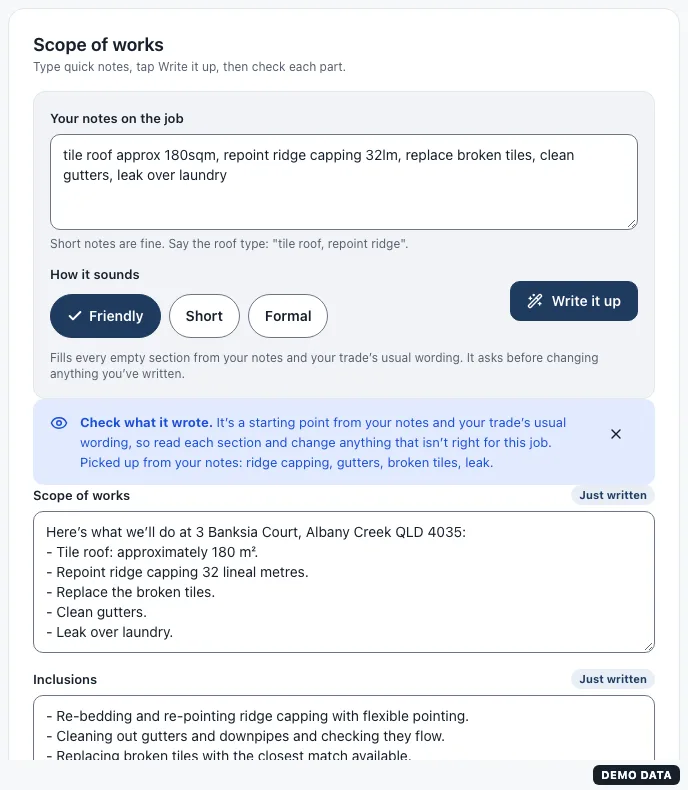
Jot them the way you would on site, with commas between them. For example: tile roof 180sqm, repoint ridge capping, clean gutters, leak over laundry.
-
Pick how it sounds
Friendly, Short or Formal. It starts on the tone you chose when you set up.
-
Press Write it up
Your notes become the scope of works, with sizes and units written out properly. Words like gutters or membrane add the matching inclusions, exclusions and materials, and your trade’s usual wording fills the rest.
Check what it wrote
Read every section. Each one it wrote is marked Just written, and every section is an ordinary text box, so change anything that isn’t right for this job.
It runs on your own device from your notes and your trade’s wording: nothing is sent anywhere to write it.
Still stuck?
Reply to any email from us, or contact us using the form on the home page.