Guide 14 of 15 · Quotes and prices
Scope of works sections
A clear scope of works heads off arguments later. Each quote can carry up to eight sections: Scope of works, Inclusions, Exclusions, Materials, Method, Timeline, Warranty and Terms. Customers see them on their quote page, the PDF, and the Word and Excel files.
Add them to a quote
-
Find the panel
Open the quote and scroll to Scope of works.
-
Add it
Press Add scope of works. Your default wording fills in by itself.
-
Pick the sections
Switch a section On to show it, or Off to leave it out. An empty section is never shown.
-
Write it
Type in the box. Press Bullet, or start a line with a dash and a space, to make bullet points.
Changes save as you type, and Undo takes back the last one.
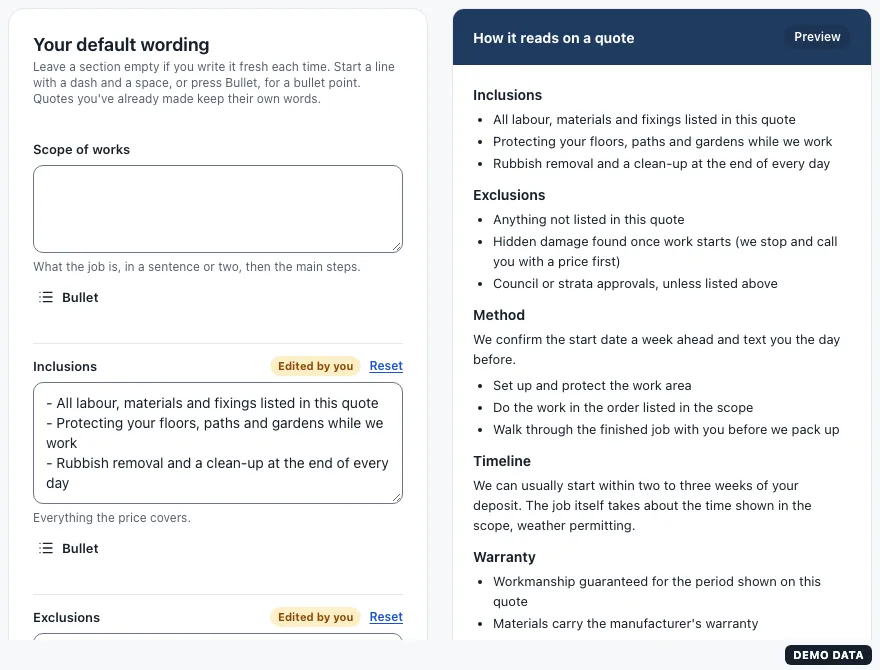
Your default wording
Go to Settings > Scope of works, write the wording you use on most jobs, like your usual exclusions and warranty, and press Save. Every new scope of works starts with it. Quotes you have already made keep their own words.
To fill the sections from your own notes, see Write up a quote from your notes.
Still stuck?
Reply to any email from us, or contact us using the form on the home page.