Guide 1 of 15 · Start here
Get set up in 10 minutes
The setup wizard walks you through everything in about ten minutes. We set a sensible default for every step, so you can press Next all the way through or Skip anything.
Start the setup
-
Open the wizard
On your dashboard, press the Getting started row, then Start setup. Part way through, it says Continue setup. Or press your picture in the top corner, then Get set up.
-
Move through the steps
Use Back, Skip and Next at the bottom. Each step saves when you press Next, and Finish later keeps your place.
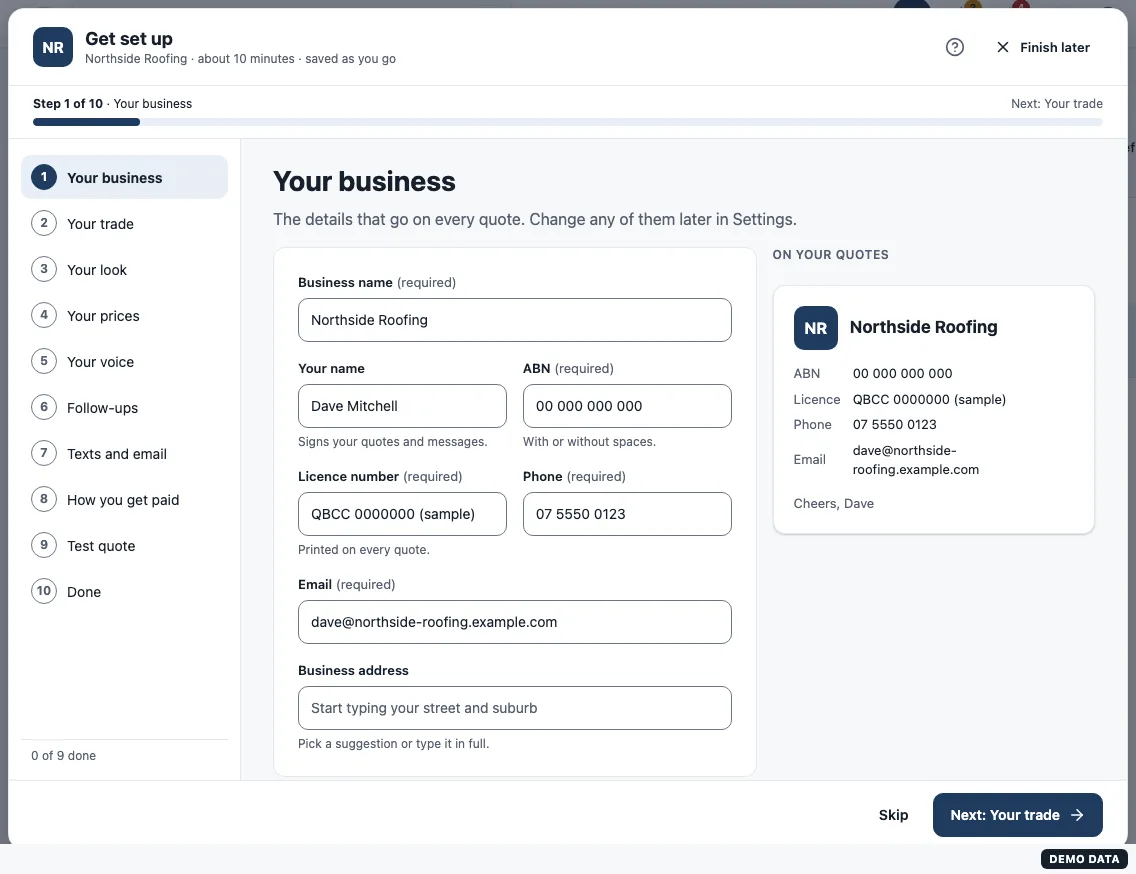
The ten steps
- Your business: name, ABN, licence, phone, email, address and logo.
- Your trade: a starting price list, job types and wording.
- Your look: a theme or your own colour, and your quote style. See Your branding, colour and quote style.
- Your prices: check each cost and margin. See Your prices and units.
- Your voice: Friendly, Straight-talking or Formal wording.
- Follow-ups: which reminders go, and when.
- Texts and email: your dedicated number and who emails come from.
- How you get paid: bank details, pay online and a deposit.
- Test quote: a quote sent to you in test mode, so you see what customers see.
- Done: what you finished or skipped, each one tap away.
What it costs
One plan: A$95 a month founders rate, month to month, cancel any time, no setup fee. Your own dedicated number is included.
Still stuck?
Reply to any email from us, or contact us using the form on the home page.