Guide 3 of 15 · Quotes and prices
Your prices and units
Your price list holds every line you put on a quote: what it costs you, your margin and the unit it is sold by. The quote builder works out each line from it, so getting it right here saves you doing the sums on every job.
Your price list
Open Settings > Services & price list. Search for an item, or show one section at a time.
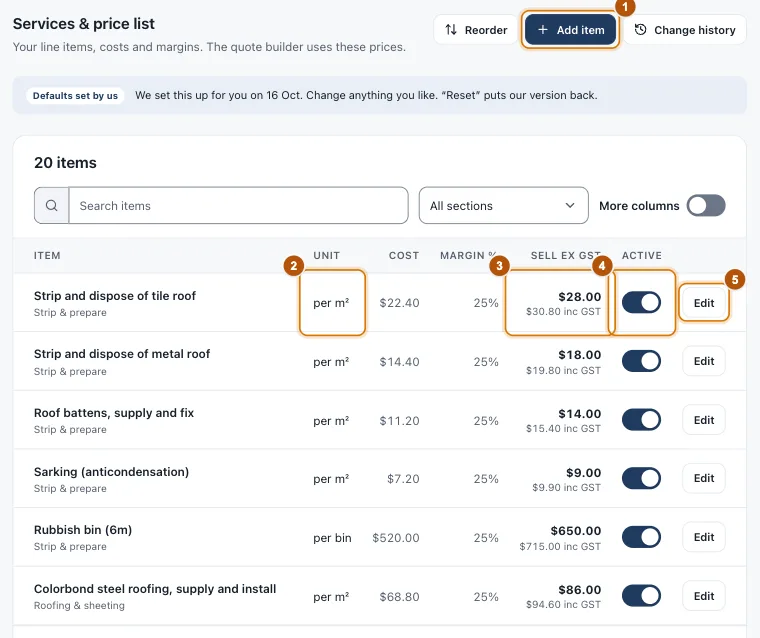
- Marker 1: Add item
- Marker 2: The unit it is sold by
- Marker 3: Sell price, with the price including GST under it
- Marker 4: Active on quotes
- Marker 5: Edit
Add or change an item
-
Open the item
Press Edit on a line, or Add item for a new one, and give it a clear name. That name is what the customer reads.
-
Choose the unit
Each, per square metre, per metre, per day and more. Fixed price has no quantity on the quote. The section decides which group it sits in on the quote.
-
Enter your cost and margin
Cost is what it costs you per unit, before GST. Your margin goes on top, and the sell price is worked out for you, with what the customer pays including GST shown underneath.
-
Switch it on or off
Active on quotes off keeps an item in your list but out of the quote builder.
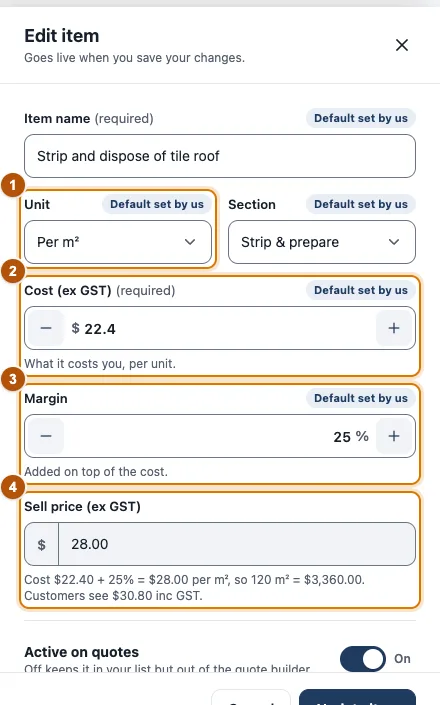
- Marker 1: Unit
- Marker 2: Cost, before GST
- Marker 3: Margin
- Marker 4: Sell price, worked out for you
Still stuck?
Reply to any email from us, or contact us using the form on the home page.