Guide 10 of 15 · Quotes and prices
Themes and your own colour
A theme sets the colours of your screens, your quotes and your customer’s quote page. Pick one of eight, or make your own from one colour.
Pick a theme
-
Open Theme
Go to Settings > Branding & theme. The eight themes are Harbour, Ember, Bushland, Shiraz, Dusk, Slate, Reef and Ochre, each with a light and a dark version.
-
Light or dark
Dark is for your own screens, handy at night. Customers always get the light version.
Use your own colour
-
Choose Custom
The ninth tile, Custom, builds a whole light and dark theme from one colour.
-
Pick your colour
Drag in the colour square and the rainbow bar, or type your colour code.
-
Or take it from your logo
Pull from my logo offers the main colours in your logo. The file is read on your device.
-
Check the previews
Under the picker you see your dashboard in light and dark, your customer’s quote page and your PDF. Nothing changes until you save, and Reset takes you back to the theme you started from.
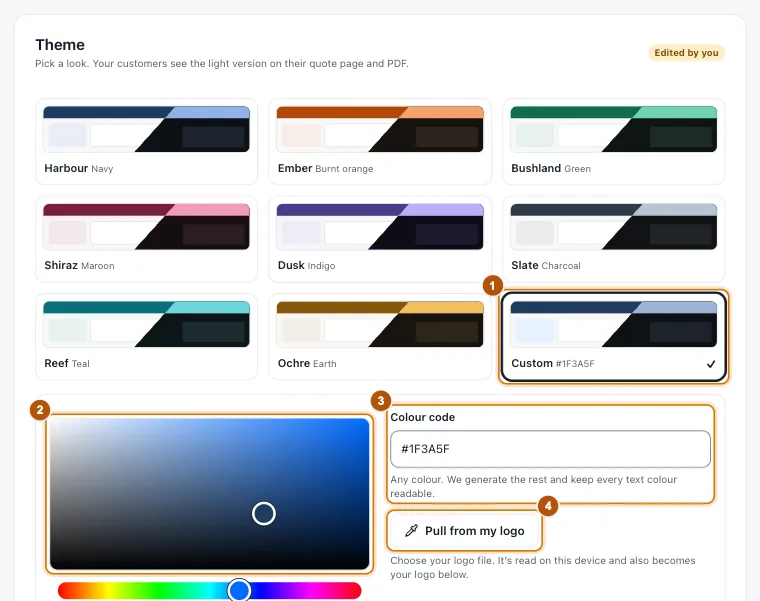
- Marker 1: Custom
- Marker 2: Pick a colour
- Marker 3: Or type its code
- Marker 4: Pull from my logo
Still stuck?
Reply to any email from us, or contact us using the form on the home page.