Guide 5 of 15 · Follow-ups and messages
When follow-ups go out (send times, quiet hours)
Once a quote is sent, its follow-ups go out by themselves. You don’t press anything. Here is what goes when, and how to set the time of day.
Which message goes when
- Day 2, if the quote hasn’t been opened: a check that it came through.
- Day 5, if it was opened but there is no answer: an offer to help with questions, and an alert to you to give them a call.
- Day 12, if there is still no answer: a last call with the date the price is held until.
- 6 months on, if they haven’t gone ahead: a check-in.
- 12 months after the job, once you tap Job complete: a check-up.
Reminders stop as soon as the customer accepts, declines or replies. For each message you can change Send after, the channel (email, text or both) and the send time.
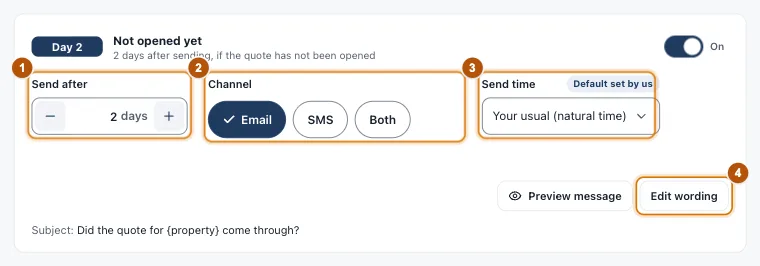
- Marker 1: Send after
- Marker 2: Email, SMS or both
- Marker 3: Send time
- Marker 4: Edit wording
Set the time of day
In Settings > Follow-ups & check-ups, find When messages go.
-
Natural or fixed time
Natural time picks a different time for each message, never on a round minute, so it reads like you sent it yourself. Fixed time sends every message at the same time.
-
Business hours
Natural times fall between your start and finish.
-
Weekends and public holidays
Off unless you switch them on: a message due then goes on the next working day.
-
Where you are
Your state or territory sets your time zone and which public holidays are skipped.
-
Quiet hours
Nothing goes to a customer between these times, even a message you send by hand.
-
Preview
Preview the next 10 send times shows how your settings play out.
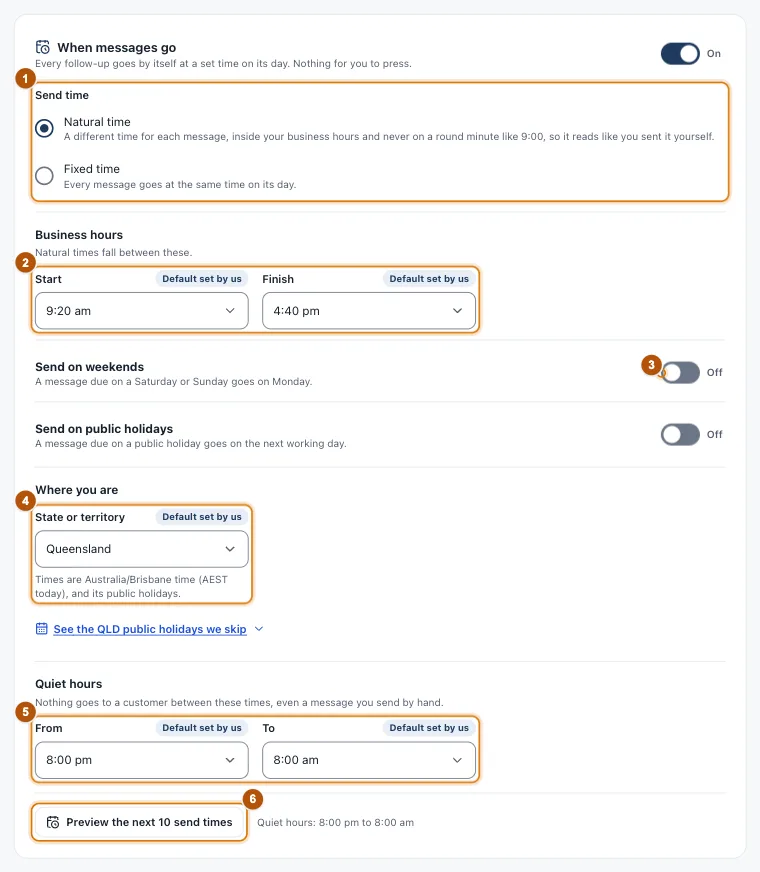
- Marker 1: Natural or fixed time
- Marker 2: Business hours
- Marker 3: Weekends (and public holidays below it)
- Marker 4: Your state or territory
- Marker 5: Quiet hours
- Marker 6: Preview the next 10 send times
Still stuck?
Reply to any email from us, or contact us using the form on the home page.